A Visual Workbench for AI Agent Workflows
The gap between "Claude in your terminal" and "agents in production" is a canvas. This is where I am so far.

Last week Anthropic announced Claude Managed Agents, composable APIs for building cloud-hosted agents at scale. It’s the right direction. But it’s aimed at developers shipping production services, not at the person who spends their Tuesday morning chaining three prompts together to turn a brief into a LinkedIn ad.
I’m that person. I’m a Manager in product design at IBM working in DPDE transformation. I use Claude Code every day: skills, slash commands, sub-agents, the whole toolbox. And I kept hitting the same wall. I could build a single skill that does one thing well, but I had no way to see how multiple skills, prompts, and decisions connect into a workflow. No way to reuse a proven sequence. No way to route only the context that matters downstream so I’m not burning tokens shipping full transcripts everywhere.
So I started building Flowbench. It’s not finished. But it’s far enough along to be worth sharing what I’ve learned.
What it is (so far)
Flowbench is a Tauri desktop app that wraps Claude Code. You drag prompt nodes onto a canvas, connect them with edges, and click Run. Each node spawns a real claude CLI subprocess against your Max subscription, so there’s no separate API billing. An orchestrator plans context routing before the run starts. Assessment nodes branch the graph based on LLM judgment. Output nodes materialize real files at the end: Word documents, Excel spreadsheets, PowerPoint decks, or designs rendered directly in Pencil with AI-generated imagery.
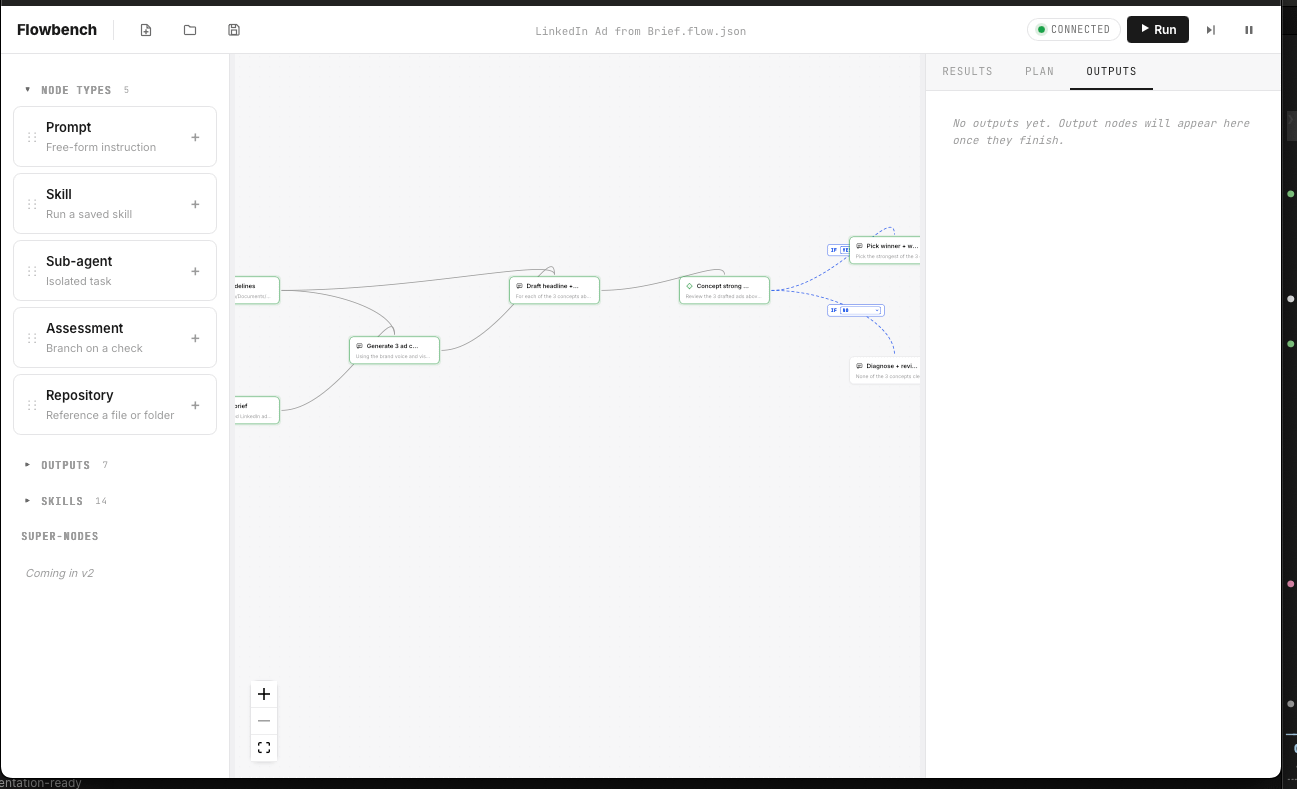
The Flowbench canvas with the LinkedIn ad workflow loaded. Six node types, branching edges, and a three-panel layout: Library, Canvas, and Results/Outputs.
It’s built with React Flow for the canvas, xterm.js for the terminal pane, and the Charcoal design system I’ve been developing for dark-first AI interfaces. The whole thing runs locally, stores flows as .flow.json files you can version in git, and ships as a universal macOS binary via GitHub Releases.
The core principle, decided in the first hour and never violated: users write intent, Claude figures out mechanics. There is no Shell node. There is no File node. If a Prompt node needs to scan a folder or call an API, the Claude subprocess handles it, the same way Claude Code does today. The canvas stays about workflow shape, not plumbing.
A lot of this still needs polish. The UX has rough edges, the error handling is honest but not graceful, and there are entire feature categories (super-nodes, run history, auto-update) that I haven’t started. But the core loop works end-to-end: drop nodes, connect them, run, get real files out the other side.
Design decisions I’ve made so far
The node palette is four types, not forty
Prompt, Skill, Sub-agent, Assessment. That’s it for the core. Plus Repository (reference a file or folder) and Output (materialize to a format). Six total. Every workflow I’ve tested fits within these six.
The temptation was to add specialized nodes for every tool Claude can use. A “Read PDF” node, a “Search Web” node, a “Write File” node. I resisted. Each of those is just a Prompt node with a specific instruction. The moment you start modeling tools as node types, you’re rebuilding Claude’s tool system as a GUI, and you lose the “intent, not mechanics” principle. Whether that holds up as more people try it, I don’t know yet.
The Inspector became a modal
The first canvas pass had a fixed Inspector strip across the bottom. Select a node, edit its fields below. It ate 200px of vertical space permanently and broke the locality of editing: the thing you were editing was way down at the bottom, not where your eye was on the canvas.
Pivoted to a per-node modal. Each node has a subtle three-dot button. Click it and you get Run, Edit, Delete. Edit opens a centered modal with all the fields. The canvas reclaims its full vertical space. This feels right so far, but I’m still iterating on it.
Skills are an accordion, not a palette
Landed on an accordion: the four node types stay primary at the top, “Skills (14)” sits below as a collapsible header. Each row shows a prettified name, is fully draggable, and has a + button. The principle: “primary palette + curated extensions” beats either “everything in one list” or “extensions hidden in detail panels.”
Output formats match the tool the team actually uses
This was a realization that came from testing, not from the PRD. The user who receives a trending content report doesn’t want a .md file. They want a Word doc they can drop into their existing review pipeline. The creative team reviewing a LinkedIn ad wants to see it rendered with real imagery in a design tool, not described in prose.
Real workflows from real discovery docs
These five example workflows weren’t hypothetical. They came from actual discovery with a client that mapped how teams work today. I pulled the diagrams, traced the process steps, and rebuilt each one as a Flowbench graph.
Each discovery diagram describes a process that takes a team days or weeks. The question I asked was: which of these can I model as a Flowbench graph that runs end-to-end in 15 to 30 minutes? The LinkedIn ad flow was the first one I built all the way through.
The LinkedIn workflow chains eight nodes: a Repository node points at brand guidelines, a Prompt node reads the brief (attached as a file), three Prompt nodes draft concepts and copy at LinkedIn’s official character limits (70 headline, 150 body), an Assessment node judges whether any concept is ship-ready, a conditional branch routes to either a final spec or a revision direction, and a Pencil output node renders the winning concept as real PNG files with AI-generated imagery.
The LinkedIn spec (sourced from business.linkedin.com) is embedded directly in the instruction template: three frame sizes (1200x628, 1200x1200, 628x1200), character limits, and CTA restricted to LinkedIn’s 10 approved button labels. The upstream copy nodes are also constrained to these limits so the output node receives text that already fits.
Is this production-ready creative? No. But it’s a first draft that took 20 minutes of supervised execution instead of a week of handoffs across SM+I, Creative, Legal, PMM, and Globalization teams. The designer can open the .pen file in Pencil, refine the layout, swap the AI image for a real product screenshot, and have something reviewable in an hour.
Where Flowbench sits (for now)
Anthropic’s Claude Managed Agents is the cloud-hosted, API-billed, developer-facing end of the spectrum. Flowbench is the local, Max-subscription, visual, power-user end. They don’t overlap today:
If Anthropic ever ships a visual Claude Code flow builder on the desktop that runs on Max, Flowbench is threatened. They haven’t. They shipped the opposite end of the spectrum. Flowbench sits in the gap. Whether that gap stays open is an honest question I don’t have the answer to yet.
What I’m working on next
The deferred list is still long:
Super-nodes: compress a proven sequence into a reusable, collapsible block
Run history: persistent, re-runnable past executions
Free terminal tab: an independent Claude Code session beside the canvas
Auto-tune: first run uses Opus for orchestration, future runs get a recommended cheaper model
Code signing: removes the one-time Gatekeeper warning on first launch
Token Estimation
Extensions
higher automation and orchestration layer and be able to dig into files on a granular level. Full vertical.
Built with Tauri, React, React Flow, xterm.js, and the Charcoal design system. Being designed and built with Claude.
I like where you’re going with this!